iLocator : Family Location
- 3.7
- Rating
- 50.00K
- Installs
- Free
- Price

 Analysis by App-foxy
I approached iLocator: Family Location as a practical navigation tool rather than another map app. Its focus is narrower: helping people check a GPS location and keep track of family members from one place. That makes it easier to understand than a full navigation suite, but it also means the app has to be judged on clarity, trust, and everyday usefulness instead of the number of map features it offers.
In my experience, the idea is appealing for households that want a simple location-centered tool without turning every trip into a complicated setup. I can see it being useful when a parent wants to know whether a teenager has reached a destination, when relatives are coordinating during a busy day, or when family members need a shared way to stay aware of one another. At the same time, I would not treat it as a complete replacement for a mature navigation platform or as an automatic solution to every family-safety concern.
How iLocator feels in its current form
The app comes from Betasoft Mobile and sits in the Maps & Navigation category. It is free to install, with optional in-app purchases ranging from $6.99 to $39.99 per item. The age rating is Everyone, which fits the straightforward family-oriented concept, although adults should still decide together how location sharing will be used and who can see it.
You May Also Like

 Blood Strike: 2.5 Anniversary
Blood Strike’s Loadouts Turn Every Drop Into a Tactical Gamble
A close look at Blood Strike’s custom loadouts: how fast access to signature weapons reshapes its battle royale rhythm, rewards preparation, and narrows the gap between fights.

 Pandora - Music & Podcasts
Pandora’s Music Is Easy to Start, but Harder to Recover
Pandora’s strength is its low-effort path from a seed to a station. Its weak spot is how much confidence it asks you to place in connection, setup, and quiet recovery.

 8 Ball Pool
 Is Built on Rivalries, Rematches, and Routine
A close look at the rivalries, rematches, shared routines, and unanswered safety questions that turn a quick pool match into a persistent mobile community.

 Samsung Music
’s Quiet Strength Is Playing What You Already Own
Its reach comes less from spectacle than from dependable access to a personal library. That simplicity is both the app’s strongest retention engine and its ceiling.

 AccuWeather: Weather Radar
AccuWeather Review: A Quick, Clear Forecast for Everyday Decisions
For everyday plans, the best forecast is the one you can understand quickly. AccuWeather makes rain timing, radar, and local conditions easy to act on, with a few trade-offs.

 Hill Climb Racing
Why Hill Climb Racing Still Turns Crashes Into One More Run
A tiny car, a bumpy hill and one more upgrade: Hill Climb Racing keeps resurfacing because its simple chaos makes every near-miss feel personal.
More From Our News Desk
View All News


The current release is version 1.6.2, and the app runs on Android 7.0 or later. That compatibility is helpful for people using older phones, especially in a household where not everyone upgrades devices at the same time. I would still make sure every family member has a phone capable of running the app before building a routine around it.
The public response is mixed rather than overwhelming: iLocator has a 3.7 average from around 243 ratings and has passed 50K installs, with 16 written reviews. I read that as a sign of a small but real user base, not as proof that the app is universally dependable. For a location-sharing product, personal testing matters more than a rating alone because battery behavior, signal quality, phone settings, and family habits can all affect the experience.
The most important thing to understand is that this is not primarily about finding the quickest route from one address to another. Its identity is built around GPS location and family location. If your main need is turn-by-turn driving directions, live traffic, transit planning, or detailed place discovery, a conventional maps service will probably feel more complete. If your need is a focused family-location workflow, this app makes more sense.
A realistic family routine
Imagine a weekday when one parent is working late, one child is traveling home, and another family member is already at an activity. Instead of sending several messages asking where everyone is, the household can use a shared location tool to establish a quick picture of the day. That can reduce unnecessary calls, particularly when someone is moving between school, work, sports, and home.
The useful habit is not checking constantly. I would open the app when there is a genuine coordination question, compare the displayed location with the expected journey, and then contact the person if something seems unusual. Location information is best treated as a helpful signal, not as a guarantee that someone is safe or available. A phone may be indoors, offline, left behind, or reporting an older position.
That distinction is one of the app’s most important practical lessons. A map marker can answer “where was this phone recently?” more reliably than it can answer “what is this person doing right now?” Families that agree on that boundary will likely have a better experience than users who expect constant, perfect visibility.
What changed by the current release
The app was released on January 18, 2024, and the current version is 1.6.2. Those details show that the product has moved beyond its first release, but they do not by themselves explain every change inside the app. I would avoid assuming that a version number automatically means a major redesign or a particular new function.
What I can say from the current state is that iLocator is being presented as an active, focused product rather than an abandoned experiment. The evolution matters because location apps need ongoing attention: operating-system behavior changes, phones become more aggressive about background activity, and users expect location information to remain understandable as devices and networks vary.
For someone already using an earlier build, the sensible approach is to update and then repeat the same small test that matters in real life. Check whether the family list is easy to read, whether the expected person appears in the right place, and whether the app remains understandable when several people are involved. A new version is valuable only if it makes those everyday checks clearer or more dependable.
I also recommend testing before an important trip rather than during one. Ask each participating family member to open the app, confirm the correct account or profile, and verify that the displayed location makes sense. This simple rehearsal can expose confusion caused by a forgotten setup step, an old phone, or a family member who has not opened the app recently.
What existing users should expect
For current users, the move to version 1.6.2 is a good reason to review the whole household workflow, not just tap an update button. Recheck who is included, decide which situations justify checking a location, and make sure everyone understands that the app supports communication rather than replacing it.
One non-obvious advantage of a focused app is that it can encourage a repeatable routine. Instead of jumping between a messaging app, a general map, and a collection of manually shared locations, a family can keep the location task in one place. That is especially useful for people who do not want to learn a large navigation platform just to answer a simple family-coordination question.
The trade-off is that a focused tool may leave you reaching for another app when the situation becomes more complicated. If a family member is late, you may still need messaging or a phone call. If you are planning a route, you may need a dedicated navigation service. If you are trying to identify a public place, a broader map database may be faster. iLocator can fit into a household’s toolkit, but I would not make it the only tool.
Another practical tip is to use it alongside an agreed check-in rule. For example, a family might decide that a location check is followed by a message when the person is late, rather than repeatedly refreshing the map. This reduces anxiety and avoids turning the app into a form of constant monitoring. The strongest use case is cooperative sharing, not silent surveillance.
Where the experience still has limits
The central limitation is inherent to GPS-based location services: the displayed position depends on the phone, its connection, and the surrounding environment. A location can be delayed or less precise, and a map cannot explain why the phone has not moved. Anyone choosing iLocator should be comfortable with occasional uncertainty.
Privacy is another area that deserves deliberate handling. The family-location concept is only healthy when the people involved understand the arrangement and can discuss it openly. Parents may have different expectations from teenagers, couples may want different boundaries, and extended families may not need access to every person’s location. I would begin with the smallest group that solves the actual problem.
There is also a cost question. The app is free to start, but optional purchases are available, so I would inspect the purchase screen carefully before committing to a paid option. I would first establish whether the basic workflow genuinely helps my household. Paying for more capability only makes sense when the limits of the free experience are clear and the extra value matches a real need.
The rating of 3.7 suggests that not every user has found the experience equally satisfying. I would not use that number as a reason to dismiss the app, but I would take it as encouragement to test it under the conditions where I need it. A location app that works well on a short trial may behave differently during a long day of travel, weak reception, or heavy phone use.
People who need polished navigation, rich route planning, traffic information, or a large ecosystem of map features should probably choose a familiar full-service alternative. People who want a dedicated family-location layer may find iLocator less distracting. The better choice depends on whether the family problem is “how do I get there?” or “how do we keep track of one another?”
Small practices that make it more useful
My first recommendation is to create a clear naming habit for family members and devices. If several phones or profiles look similar, a vague label can cause mistakes at exactly the wrong moment. Use names that make sense to everyone in the household, and remove old entries that could create confusion.
My second recommendation is to test the app from two different places before relying on it. Have one person remain stationary while another moves a short distance, then compare what each person sees. This is more informative than simply opening the app once because it checks whether the family understands how movement and updates appear in practice.
My third recommendation is to avoid treating the most recent map position as a live conversation. If you are collecting a child from an activity, use the location as a planning aid and keep a direct contact method available. If the marker looks wrong, ask first. That approach respects the limits of GPS and prevents a small technical delay from becoming a needless emergency.
A fourth useful habit is to review the setup after changing phones. Families often replace one device while leaving old assumptions untouched. Before the next trip, confirm that the intended phone is the one being used and that the household still knows how to interpret the displayed information. This is a mundane step, but it prevents many avoidable misunderstandings.
Who should try it, and who should skip it
I would recommend giving iLocator a fair trial to families that want a simple way to coordinate locations, especially when not everyone wants a feature-heavy maps platform. It may also suit relatives who live separately but occasionally need a shared view during errands, appointments, or travel days.
I would be more cautious if your household expects perfect real-time accuracy, detailed safety automation, or a complete navigation replacement. The app’s purpose is focused, and expecting it to behave like a full mapping ecosystem could lead to disappointment. It is also not the right fit for a family that has not agreed on location-sharing boundaries.
For older Android phones, the minimum operating-system requirement of Android 7.0 or later is reassuring, but compatibility is only the first check. The real question is whether the app is comfortable to use on each device in the household. A tool that one family member cannot understand or access easily will weaken the whole routine.
The free entry point makes experimentation straightforward. I would install it, involve only the people who genuinely need access, and test a normal day rather than an artificial one. If it reduces repeated “where are you?” messages without creating new confusion, it has earned a place in the household. If everyone still prefers a general map and messaging combination, there is little reason to force a separate app into the routine.
What I would watch next
As iLocator continues to evolve, I would watch for improvements that make location status easier to interpret rather than simply adding more screens. Clear indications of freshness, understandable family organization, and a low-friction setup would matter more to me than a long list of extra tools.
I would also pay attention to how the app handles the balance between convenience and control. Family location is sensitive by nature, so transparent sharing choices and easy-to-understand account management are important parts of the product experience, not minor extras. Users should feel that the app supports an agreement they made, not that it quietly creates one for them.
The current version gives the app a reasonable basis for trial, while its moderate rating reminds me to keep expectations realistic. I see a useful niche here: a straightforward location companion for families that value a dedicated space for checking where people are. I do not see a reason to abandon established navigation tools if route planning is your main concern.
My final view is positive but measured. iLocator: Family Location is worth trying when your everyday problem is family coordination, not general navigation. Start with a small group, test it before depending on it, agree on sensible privacy boundaries, and keep messaging or calling available for anything important. Used that way, it can be a practical addition to a family’s phone habits; used as a promise of perfect, continuous tracking, it is likely to create expectations the technology cannot always meet.
FAQs for iLocator : Family Location
01What is iLocator: Family Location and what does it do?
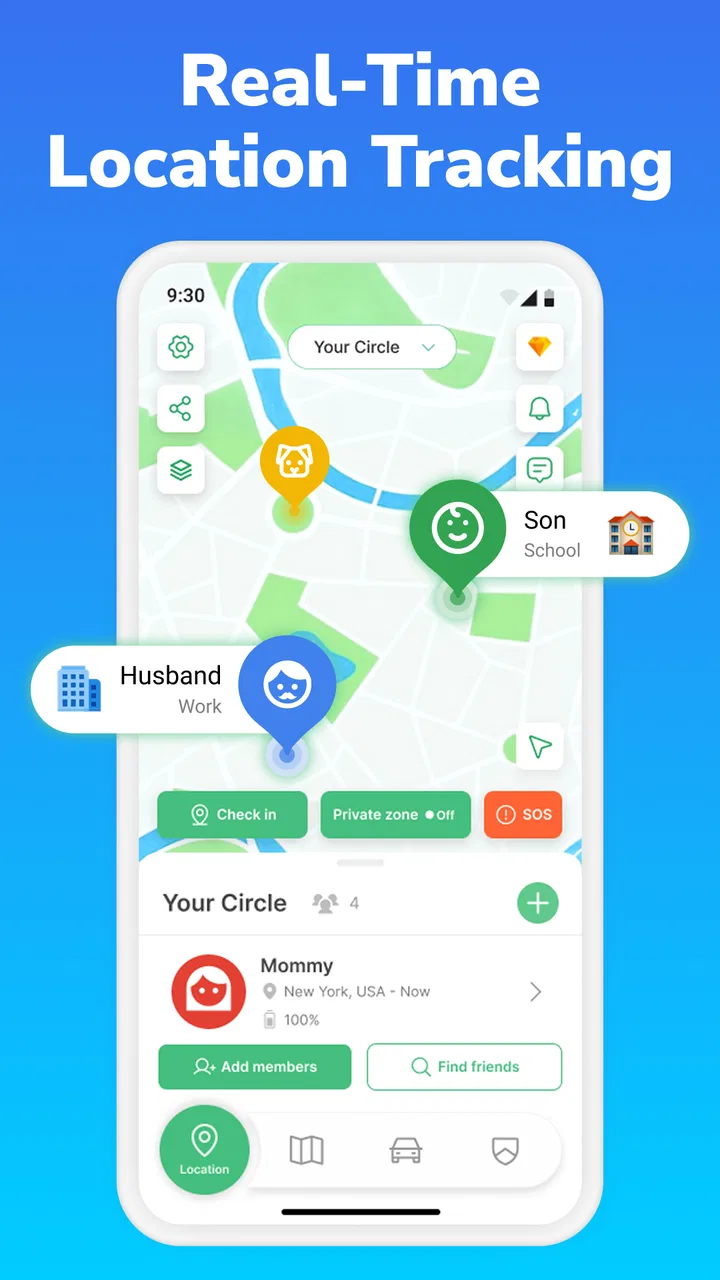
iLocator: Family Location is designed to help families share their locations and stay connected throughout the day. After creating or joining a private family group, members can view shared locations on a map, depending on the permissions each person grants. It may also provide tools such as location updates, place notifications, or communication features, although the exact options can vary by device, subscription, and app version.
02Does iLocator: Family Location require permission from every family member?
Yes. Location-sharing applications should only be used with the clear knowledge and consent of the people being monitored. Each family member normally needs to install the app, create or join the appropriate group, and approve location, notification, and possibly background activity permissions. iLocator should not be used to track someone secretly. Location visibility can generally be adjusted or stopped through the app or the device’s privacy settings.
03Does iLocator work on both Android and iPhone?
iLocator: Family Location may be available for Android and iOS, but compatibility can depend on the specific operating-system version, device model, and app release. Before downloading, check the official store listing for supported requirements. For reliable updates, the app may need permission to run in the background, access location continuously or periodically, and use mobile data when Wi-Fi is unavailable.
04Will iLocator drain the battery or use a lot of mobile data?
Like most family location services, iLocator can affect battery life because location information may be collected while the app is not open. The impact depends on update frequency, GPS accuracy, signal quality, background restrictions, and how often the map is refreshed. It may also use mobile data, especially when members are traveling. Adjusting update settings and avoiding unnecessary high-accuracy tracking can help reduce consumption.
05Is iLocator: Family Location free, and are there in-app purchases?
The basic download may be free, but some iLocator features can require a subscription or in-app purchase. Premium options may include longer location history, additional family members, place alerts, enhanced support, or other advanced tools. Pricing and trial conditions can change, so review the current Google Play or App Store listing before registering. Also check renewal terms carefully if you activate a recurring subscription.
Pros
- Simple map view makes family locations easy to check at a glance.
- Useful location-sharing controls help protect personal privacy.
- Can provide reassurance when children or relatives are traveling.
- Location updates may help coordinate pickups and daily routines.
- Designed for family use rather than complex professional tracking.
Cons
- GPS accuracy can drop indoors or in areas with weak signal.
- Continuous location sharing may noticeably affect battery life.
- All family members may need the app and a compatible device.
- Background tracking can raise privacy concerns for some users.
- Some features may depend on subscriptions or in-app purchases.

iLocator : Family Location
Gallery